How to Scrape YouTube Transcripts Without Coding in 2026
The official YouTube API won't give you other channels' transcripts. Here's how to pull them at scale in text, SRT, WebVTT, or JSON, with a flat price per transcript regardless of video length.
15-second summary
You can’t download transcripts of other people’s videos through the official YouTube API. It only serves captions for videos you own. The fastest workaround is a scraper. In this guide I’ll use YouTube Scraper with Transcripts & Comments to pull transcripts from search results, channels, or video URLs in plain text, SRT, WebVTT, or timestamped JSON. No code, no API key, and a flat price per transcript whether the video is 2 minutes or 3 hours. Your free Apify credits cover roughly 700 videos a month, so you can test everything in this article without paying a cent.
Why you can’t just use the YouTube API
Here’s the part that surprises everyone the first time.
The YouTube Data API has a captions endpoint, but captions.download requires OAuth authorization from the channel that owns the video. In practice that means you can download captions for exactly one channel: yours. For anyone else’s videos, the official answer is no.
Even if that weren’t the case, the API gives every project 10,000 quota units per day, and you burn them fast. There’s no bulk endpoint for “give me the transcripts of these 500 videos”.
So if you want transcripts at scale, for research, for AI pipelines, for content analysis, you have two real options:
- Click through every video manually, open the transcript panel, and copy-paste. Fine for 3 videos. Soul-destroying for 300.
- Use a scraper that reads the same public transcript data your browser sees.
This guide covers option 2.
Is it legal to scrape YouTube transcripts?
Short version: scraping publicly available data is generally legal, and transcripts of public videos are publicly available. The landmark hiQ v. LinkedIn case established that scraping public pages doesn’t violate the CFAA.
Two things you’re still responsible for:
- Copyright. A transcript is the video creator’s content. Analyzing it, searching it, summarizing it, or using it for research is a very different thing from republishing someone’s entire script as your own. Don’t do the second one.
- Personal data. If your use case touches personal data of EU citizens, GDPR applies. Analytics and research are usually fine; always check with a lawyer if you’re unsure.
This article and the tool are not affiliated with YouTube in any way.
What you’ll need
- A free Apify account (sign up with Google or GitHub, no card needed)
- A list of YouTube videos, a channel, or just a search term
- About 3 minutes
Step 1: Open the scraper
Go to YouTube Scraper with Transcripts & Comments and click Try for free. If you’re new to Apify it’ll ask you to sign up first; the free plan includes $5 of monthly credits, which is enough for about 700 videos with transcripts.
Step 2: Tell it what to scrape
You have two ways to feed it videos, and you can mix both:
- Search queries: type what you’d type into YouTube’s search bar, like
ai coding assistant review. The scraper will find the videos for you, with optional filters for upload date, duration, and sort order. - Start URLs: paste direct links to videos, channels (a URL or just
@handle), or playlists.
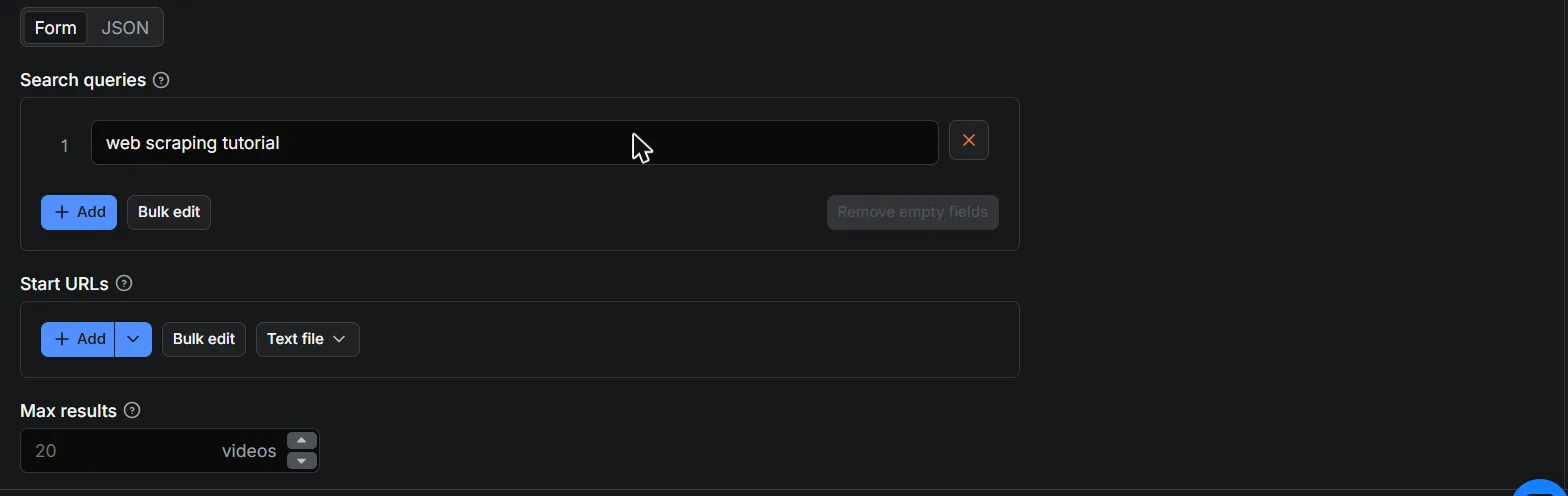
Set Max results to however many videos you want per query or channel.
Step 3: Switch on transcripts
Open the Video enrichment section and toggle Download transcripts.
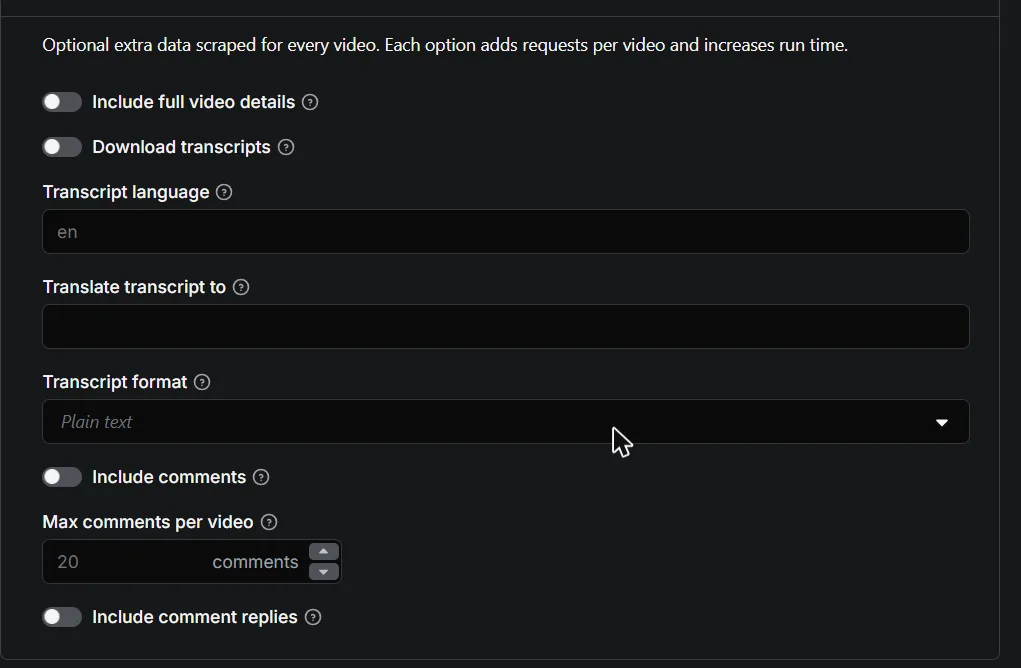
Three options worth knowing here:
- Transcript language: the preferred source language, like
enores. It falls back to whatever the video has, including auto-generated captions. - Translate transcript to: give it a language code and YouTube’s machine translation kicks in. English transcripts of French cooking videos, done.
- Transcript format: plain text for AI and analysis work, SRT or WebVTT if you need subtitle files, or JSON segments with start times if you’re building something that jumps to timestamps.
Step 4: Start and download
Click Start. A run over 50 search results with transcripts takes a couple of minutes. When it finishes, the Output tab shows one row per video:
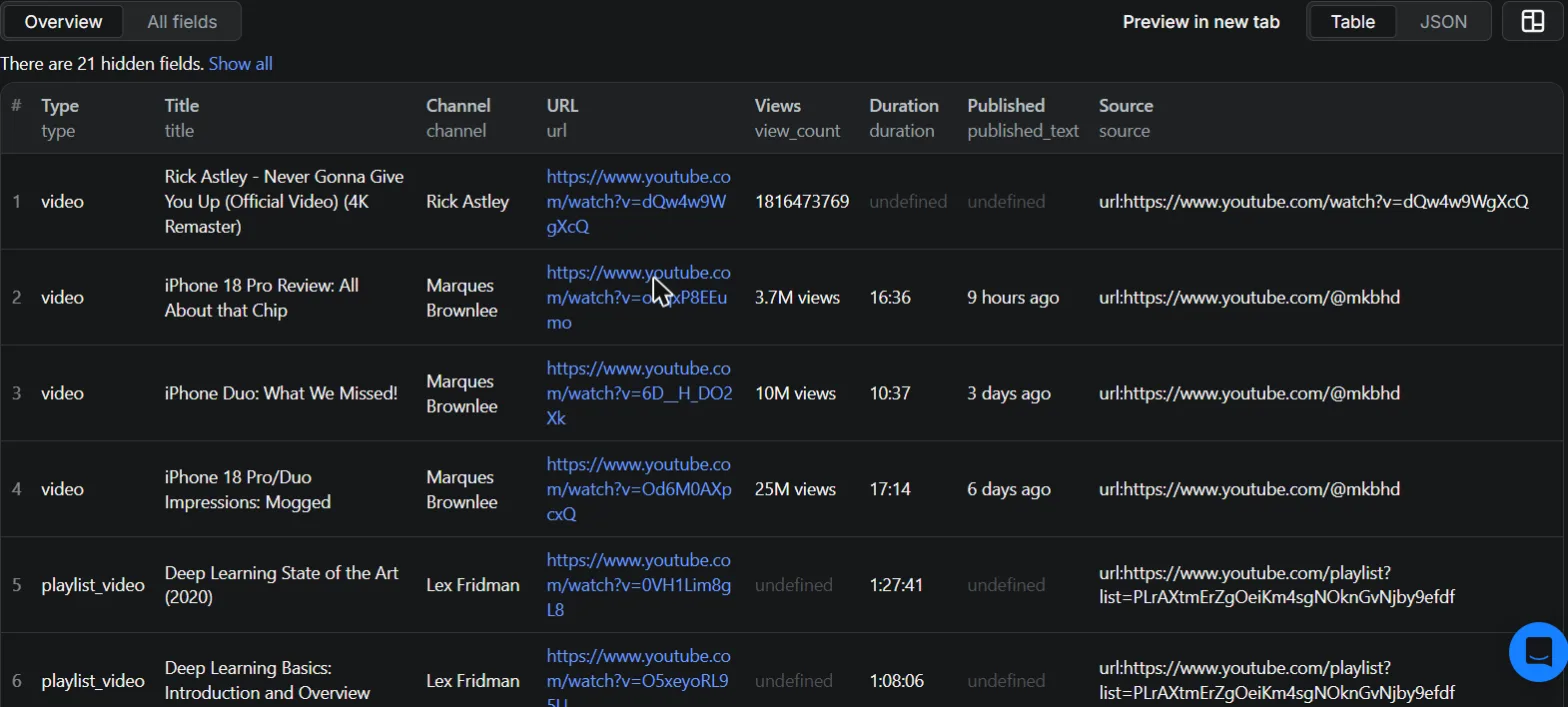
Hit Export and pick JSON, CSV, or Excel. Each item looks like this:
{
    "type": "video",
    "video_id": "dQw4w9WgXcQ",
    "title": "Python Full Course for Beginners",
    "channel": "Programming with Mosh",
    "duration": "6:18:22",
    "view_count": "12,345,678 views",
    "url": "https://www.youtube.com/watch?v=dQw4w9WgXcQ",
    "transcript": {
        "language": "en",
        "format": "text",
        "text": "In this course you will learn Python from scratch..."
    }
}
That 6-hour course transcript? Costs the same as a 2-minute short. More on that below.
What about videos that have no captions?
Not every video has a transcript. When one doesn’t, the scraper doesn’t fail your whole run and doesn’t silently skip it either. The row comes back with a transcript_error field telling you why, and you’re not charged a transcript fee for it. Rows that fail completely (deleted videos, broken URLs) come back as error items, which are free.
What does it cost?
This is where most transcript scrapers get you. Several popular tools bill transcripts per minute of video. At the going rate of $0.041 per minute, a single 10-minute video costs $0.41, and 1,000 of them cost over $400.
This scraper charges flat:
| What | Price |
|---|---|
| Video result | $2.00 per 1,000 |
| Transcript add-on, any video length | $5.00 per 1,000 |
| 1,000 videos with transcripts, total | $7.00 |
Podcasts, lectures, 4-hour live streams: same price as shorts. If your videos average anything over 2 minutes, flat pricing wins by a mile.
What can you do with scraped transcripts?
- Feed an LLM. Summarize a channel’s entire back catalog, build a RAG knowledge base from conference talks, or fine-tune on domain-specific speech.
- Content research. Search what 500 creators in your niche actually say, not just their titles.
- Brand monitoring. Find every mention of your product in video speech, where social listening tools are blind.
- Subtitles. Export SRT or WebVTT and reuse them in your own editing workflow.
- Translation research. Pull transcripts machine-translated into your language.
Prefer Python?
The scraper is built on tubescrape, an open-source MIT-licensed Python library. If you’d rather own the pipeline:
pip install tubescrapefrom tubescrape import YouTube
yt = YouTube()
transcript = yt.get_transcript('dQw4w9WgXcQ')
print(transcript.text)Running it yourself means handling proxies and YouTube’s rate limits on your own, which is exactly the work the hosted version does for you. Pick your trade-off.
FAQ
Is it legal to scrape YouTube transcripts? Scraping public data is generally legal. You remain responsible for copyright and personal data compliance in your use of it. See the legality section above.
Do I need a YouTube API key? No. That’s the point. The official API wouldn’t give you other channels’ transcripts anyway.
Does it work with auto-generated captions? Yes, both uploaded and auto-generated captions work, and you can prefer one over the other.
Can I get transcripts in another language? Yes. Pick the source language, or use the translate option for YouTube’s machine translation.
How much does 1,000 transcripts cost? $7.00 total ($2 for the video rows, $5 for the transcripts), regardless of video length. The first ~700 videos each month fit in Apify’s free credits.
Can I automate it? Yes. Schedules in the Apify Console, webhooks, the REST API, Make/Zapier/n8n integrations, or MCP if you want transcripts flowing straight into Claude or another AI agent.
What’s the maximum video length? There’s no extra charge by length. Transcripts of multi-hour streams and lectures work fine.
Wrapping up
The official API won’t hand you transcripts, manual copy-paste doesn’t scale, and per-minute pricing punishes exactly the long-form content transcripts are most useful for. A flat-price scraper closes all three gaps: paste URLs or a search term, toggle transcripts, export.
Try YouTube Scraper with Transcripts & Comments free on Apify. Your monthly free credits cover about 700 videos, no card required.
Found a bug or missing a feature? Open an issue on the actor’s Issues tab or on GitHub. I read everything.